Stop guessing where your ad budget goes. See it all in one place.
Spend, ROAS, leads and conversions across Facebook and Google on a single live dashboard - so you kill what's losing and double down on what's winning. No more logging into three platforms to guess.
Available on Business and Enterprise. 30-day money-back guarantee.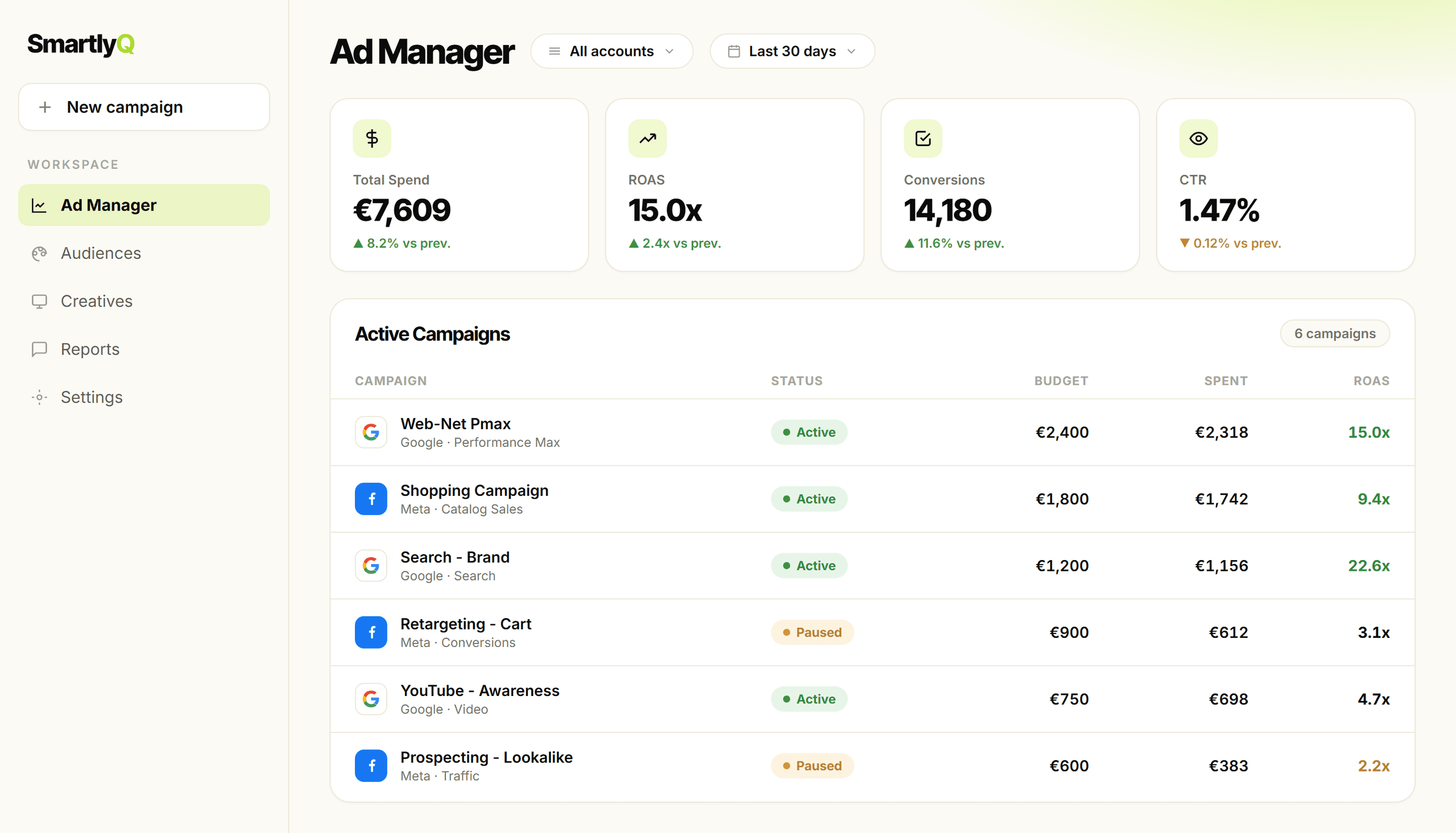
Your ad data lives everywhere except where you need it
Running campaigns across Facebook and Google means jumping between tabs, exporting numbers and guessing at what's actually paying off.
Scattered across platforms
Log in to Facebook, then Google, then back again - every check costs you time and context.
No single view of ROAS
Spend lives in one place and returns in another, so true performance is never on one screen.
Budget leaking quietly
Without a unified view, weak campaigns keep spending while you focus on the loud ones.
Reporting eats your week
Manual exports and copy-paste spreadsheets pull you away from the work that grows the account.
Your entire ad operation, on one screen
See spend, return and results across networks side by side - so you cut what's losing and pour budget into what's winning.
All your KPIs in one view
Facebook & Google, side by side
All your accounts
Roll up every connected ad account into one view, or filter to just one.
Any date range
Compare last 7, 30 or 90 days - or any custom window you choose.
Live campaigns
Monitor active campaigns and spot what is working at a glance.
Know your real return at a glance - across every network
Stop exporting spreadsheets from three platforms. See what each euro returns in one place and put budget where it performs.
From scattered ads to clear decisions in 3 steps
Connect ad accounts
Link your Facebook and Google Ads accounts in a few clicks.
See unified performance
Spend, leads, conversions and ROAS land on one screen - filter by account and date range.
Act on what works
Spot winning campaigns, cut the waste and move budget where it returns.
Native dashboards vs spreadsheets vs Ad Manager
Native ad dashboards
- Where data livesOne per platform
- Facebook + Google togetherSeparate logins
- ROAS viewPer platform only
- UpdatesLive but siloed
- EffortConstant tab-switching
Spreadsheets & exports
- Where data livesIn a file you maintain
- Facebook + Google togetherManual to combine
- ROAS viewOnly if you build it
- UpdatesStale the moment you export
- EffortHours of manual work
SmartlyQ Ad Manager
Best value- Where data livesOne unified dashboard
- Facebook + Google togetherSide by side
- ROAS viewAcross all accounts
- UpdatesReal-time performance
- EffortJust connect and read
Ad Manager, answered
What you need to know before you connect your ad accounts.
Which ad platforms does it support?
What metrics can I see?
Can I view multiple ad accounts at once?
Can I monitor active campaigns?
How does it fit with the rest of SmartlyQ?