SmartlyQ
AI Workforce
Hire a team that does the work. You just say yes.
Tell a specialist what you need in your own words. It plans, drafts and schedules from your real business data, then waits for your approval before anything goes out.
Available on plans with AI Captain. 30-day money-back guarantee.You"Three posts this week"
SofiaSocial Media Manager
NikosEmail Marketer
MariaSEO & Content
Waiting for you
Done
You talk to the team. The team does the work.
One real exchange with Sofia, the Social Media Manager in our demo bakery, from the first message to the published post.
- 01
You say it
In your own words, in your own language. No brief template, no form.
- 02
Sofia plans and drafts
She reads your business profile and your connected pages, proposes the week, and asks before any priced step.
- 03
You approve
Each post is its own card. Post, Edit, Skip or Approve all, from the app or from WhatsApp, Telegram and Messenger.
- 04
It goes out, and you see it
The post publishes at its time. The work queue marks it Done and Activity keeps the record.
Sofia
Social Media Manager
Thirteen specialists, and you approve every one
Hire one or build a whole team. Every member reads your business profile and works inside the SmartlyQ tools you already use.
Pick a specialty, or describe your own
Social Media Manager
Email Marketer
SEO & Content
Ads Specialist
Content Writer
Community Manager
Business Manager
Sales Assistant
Personal Assistant
Financial Assistant
Video Creator
Video Editor
Custom Agent
Approve from wherever you are
Every card shows who proposed it, the full text, where it goes, when, and the credit cost of priced steps. The same card reaches you in your messaging apps.
WhatsAppTelegramMessengerThe app
Nikos, Email Marketer
Draft campaign: Weekend pre-orders are open
Open draftSkip
Autonomy per member
Ask first, Draft for review, or Autonomous. Set it on each member's card and lower it any time.
Always asks first
Emails to customers, ad launches and budget, bookings, public replies and anything that touches money, whatever the setting.
Pause the team
One switch stops every member until you resume. Activity keeps the record of what was proposed, waiting and done.
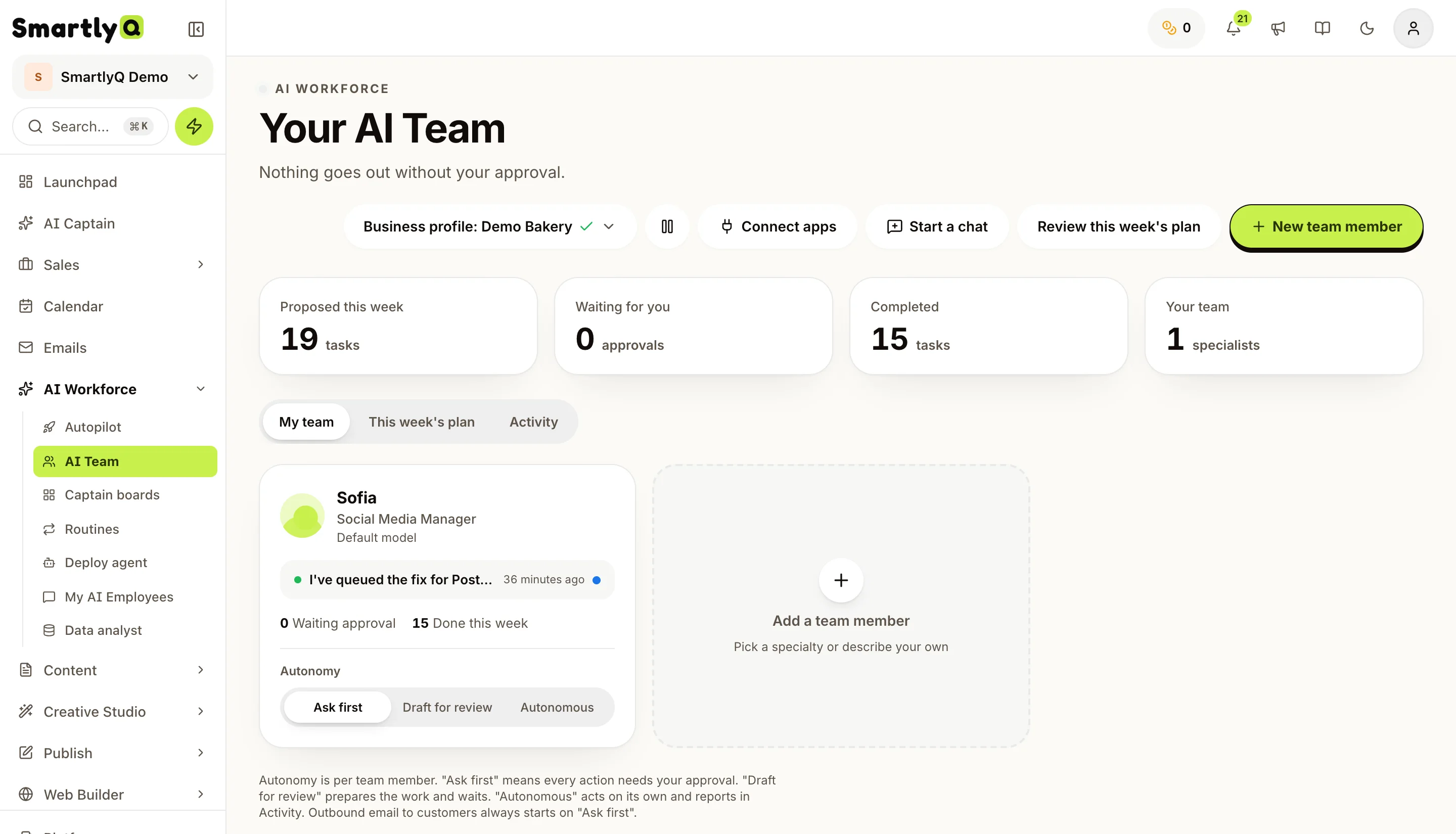
This is the real AI Team page
Our demo bakery, as it looks in SmartlyQ: what was proposed this week, what is waiting for you, and Sofia with her autonomy set to Ask first.
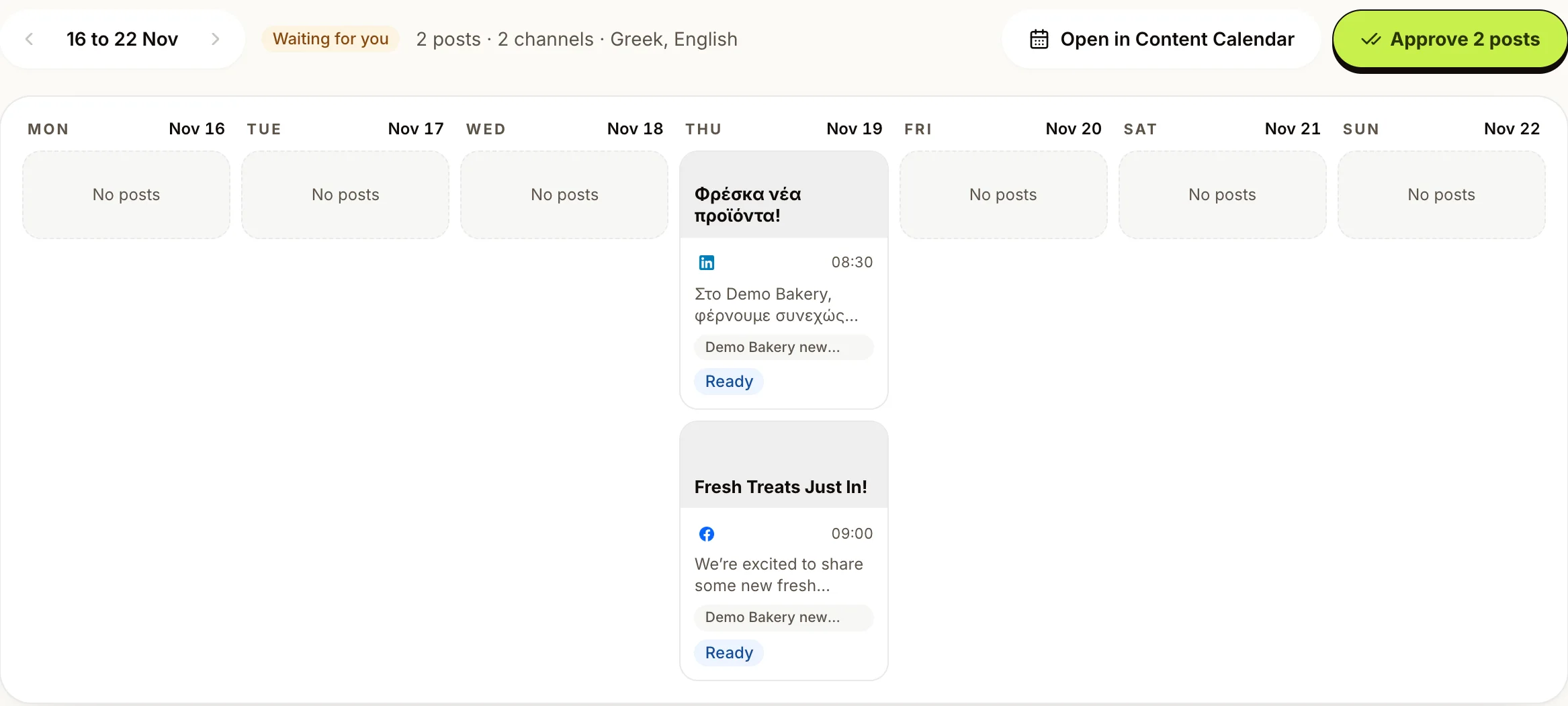
Or let Autopilot plan the week
Every Sunday evening Autopilot drafts next week's posts, in the language you set for each channel. Read the week on one board and approve it in one tap, or post by post. Instagram drafts come with a picture to approve.
Set each channel to Every post, Week, Unless I say no, or Full.
Six more tools in the same queue
The AI Team and Autopilot are two of the eight entries under AI Workforce. Whatever the others propose lands under Waiting for you.
AI Captain
The general assistant for any question or task.
Routines
Jobs AI Captain repeats on a schedule, like the Monday report.
Deploy agent
Puts your Captain into your messaging apps, where customers write to you.
Captain boards
Collect videos, links and documents on a canvas and work through them with Captain.
My AI Employees
Chat assistants you build yourself, trained on your own material.
Data analyst
Answers questions about your documents and data in plain language.
Nothing goes out without your yes
The team drafts overnight. You read the cards over coffee and tap the ones you like. That is the whole job now.
Say it
They draft
You approve
It ships
13 specialists
social, email, SEO, sales, ads, video
3 autonomy levels
per member, change them any time
1 approval queue
for the whole workforce
Doing it yourself vs an agency vs the AI Team
Yourself
- Starts workingWhen you find a free hour
- Knows your businessIt is all in your head
- Who approvesYou, by doing the work
- When drafts arriveLate in the evening
- What it costsYour evenings and weekends
A freelancer or agency
- Starts workingAfter onboarding
- Knows your businessAfter a briefing call
- Who approvesThem first, you later
- When drafts arriveOffice hours
- What it costsA monthly retainer
SmartlyQ AI Team
Best value- Starts workingThe minute you hire it
- Knows your businessReads My Business and your connected accounts
- Who approvesYou, one tap per card
- When drafts arriveWaiting for you in the morning
- What it costsCredits per task, shown before you approve
Loading testimonials...
Before you hire
The questions owners ask us before their first specialist.
What is the AI Workforce?
How do I give a specialist work?
Can a specialist publish or send without me?
What does it cost?
Which plan includes the AI Team?
What do I need to do first?
Can I stop everything at once?